Media > RealMCU Bluetooth DOC MCP Goes Live: AI Agents Connect Directly to Official Bluetooth Documentation
RealMCU Bluetooth DOC MCP Goes Live: AI Agents Connect Directly to Official Bluetooth Documentation
2026-11-18
RealMCU today announced Bluetooth DOC MCP (Bluetooth Documentation Model Context Protocol), a documentation retrieval service built on the open Model Context Protocol standard introduced by Anthropic. Delivered as a cloud-hosted server, it lets mainstream AI Agents such as Claude Code, Cursor, Codex, Trae, Cline, Roo Code and Continue search RealMCU's official Bluetooth documentation without leaving the development environment, moving the "look it up in the manual" step from manual paging to automatic retrieval.
As Bluetooth products grow richer in features, the material developers must consult now spans core specification and profile requirements, AT command references, firmware development guides and platform adaptation notes, and covers concrete areas such as pairing and reconnection, audio codecs and calls, and low-power links - spread across a large and fragmented set of documents. The traditional approach relies on keyword search and page-by-page reading, which neither pinpoints a specific section quickly nor gives an AI coding assistant a way to cite that official content. Until that content is wired in, AI Agents tend to fall back on generic advice instead of addressing technical implementation details. That is also what separates a document query MCP from an AI chatbot: the website assistant answers a developer's own questions, and the developer carries the answer back into the work; the MCP hands the same official knowledge base to the AI Agent, which retrieves it automatically while coding and debugging, so its answers land on the actual Bluetooth implementation.
Bluetooth DOC MCP is designed to close that gap. It is a cloud-hosted remote MCP server that serves as a knowledge layer: an AI Agent sends a retrieval request over the standardized MCP protocol, the server runs a semantic search across RealMCU's official knowledge base, and returns the most relevant text snippets together with source links, which the Agent can use as authoritative references for its answers and code decisions. The knowledge base spans the Bluetooth protocol stack, profiles and pairing flows through to AT commands, firmware development and platform adaptation, so specs, commands and samples are all reached from one entry point.
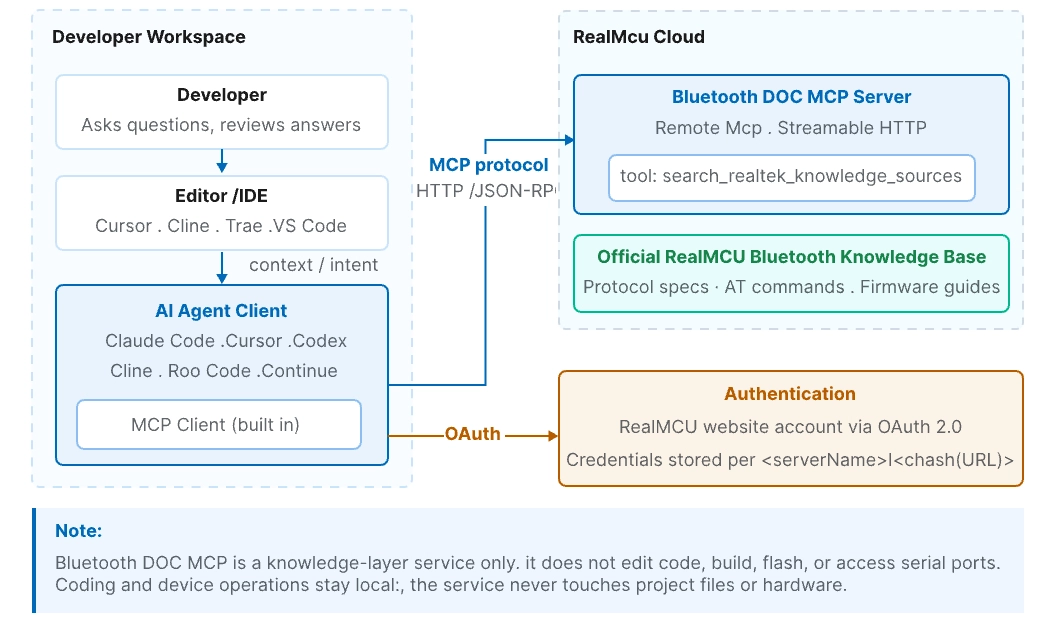
Figure 1: Bluetooth DOC MCP architecture - AI Agents retrieve from the official cloud knowledge base over the MCP protocol
The service uses HTTP-based Streamable HTTP transport, so clients need no local installation at all - only a server address. It exposes a single tool, search_realtek_knowledge_sources(query), covering RealMCU's official Bluetooth protocol, AT command, and firmware development and adaptation documentation. Unlike keyword matching, semantic retrieval understands the intent behind a question, so even when a developer's wording differs from the source text, the relevant technical detail is still surfaced - with traceable source links for verifying the original passage.
For developers, this means they can ask in an AI conversation, for example "query Bluetooth AT command usage" or "search the RealMCU Bluetooth pairing process development documents", and have the AI Agent call the MCP server to retrieve and answer on its own, without switching between PDFs and web pages. For teams maintaining several product lines, a single knowledge source also lowers the cost of onboarding and cross-project reuse.
Onboarding is equally lean. After signing in to the RealMCU website, developers can obtain the server address from the "Use MCP" entry in the AI assistant dialog, or use https://www.realmcu.com/aiask/mcp directly. Authentication reuses the RealMCU website account via OAuth, and mainstream AI Agents each offer a corresponding setup path: Claude Code completes registration and authentication with a single command line, Cursor and Cline accept the server address directly in their graphical settings, and other clients can be configured through standard MCP JSON or YAML snippets. RealMCU recommends using realmcu-mcp-docs as the server name and configuring it in user scope, so the same credentials are shared across project directories and re-authorization is avoided. For the full setup steps, per-client configuration samples and troubleshooting, see Get Started.
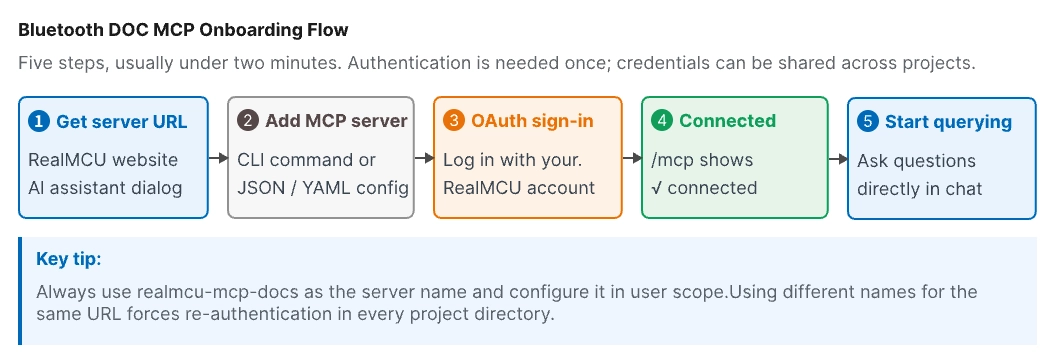
Figure 2: Onboarding and authentication - five steps to configure, with credentials reusable across projects
Bluetooth DOC MCP supports both explicit and implicit invocation. With explicit invocation the developer names the MCP server in the instruction, for example "query Bluetooth AT commands through the realmcu-mcp-docs MCP", which is the most reliable. With implicit invocation the AI Agent loads the MCP description and decides on its own whether retrieval is needed, which feels more natural. If the Agent does not call it, switching to an explicit instruction is enough.
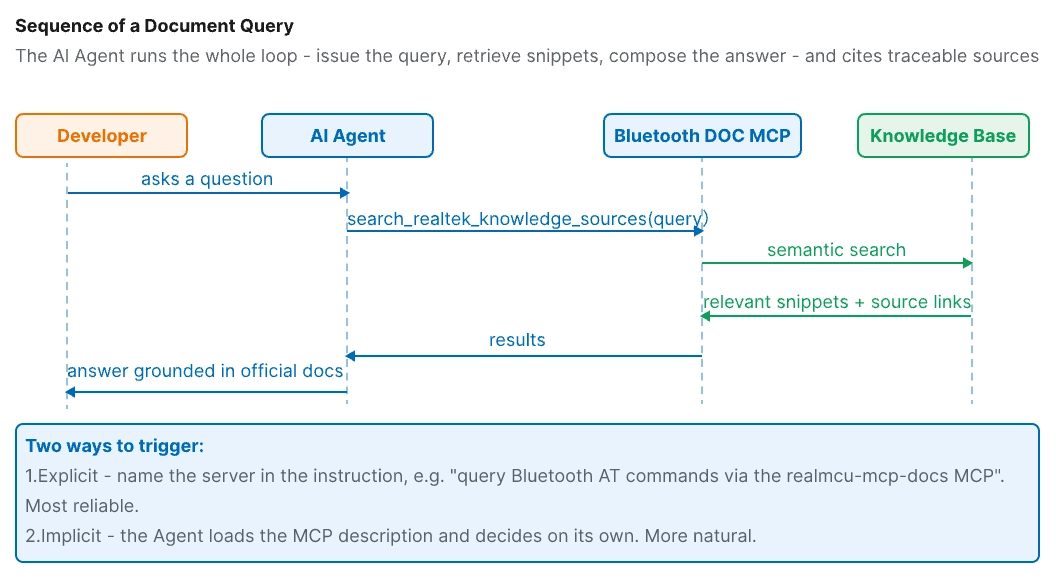
Figure 3: Sequence of a document query - from the question to an answer with traceable sources
Bluetooth DOC MCP is now live on the RealMCU production website. Developers can authenticate with their RealMCU website account and follow Get Started to begin, with no extra application or local service required.




 苏公网安备32059002006558号